

Auto & Equipment Services Back Office
Your whole shop in one workbook — no software, no subscription, yours to own outright.
Auto & Equipment Services Back Office is a complete spreadsheet backend for an auto, small engine, or equipment service business run by one or two people. The estimate waiting on an answer. The truck that's been ready since Tuesday and nobody called. The mower sitting waiting on a belt. The deposit you're not sure was paid. The customer who's due for service and doesn't know it yet. It's all in one place, and it works while you're working.
Everything a small business needs. Nothing it doesn't.
What's inside (18 tabs):
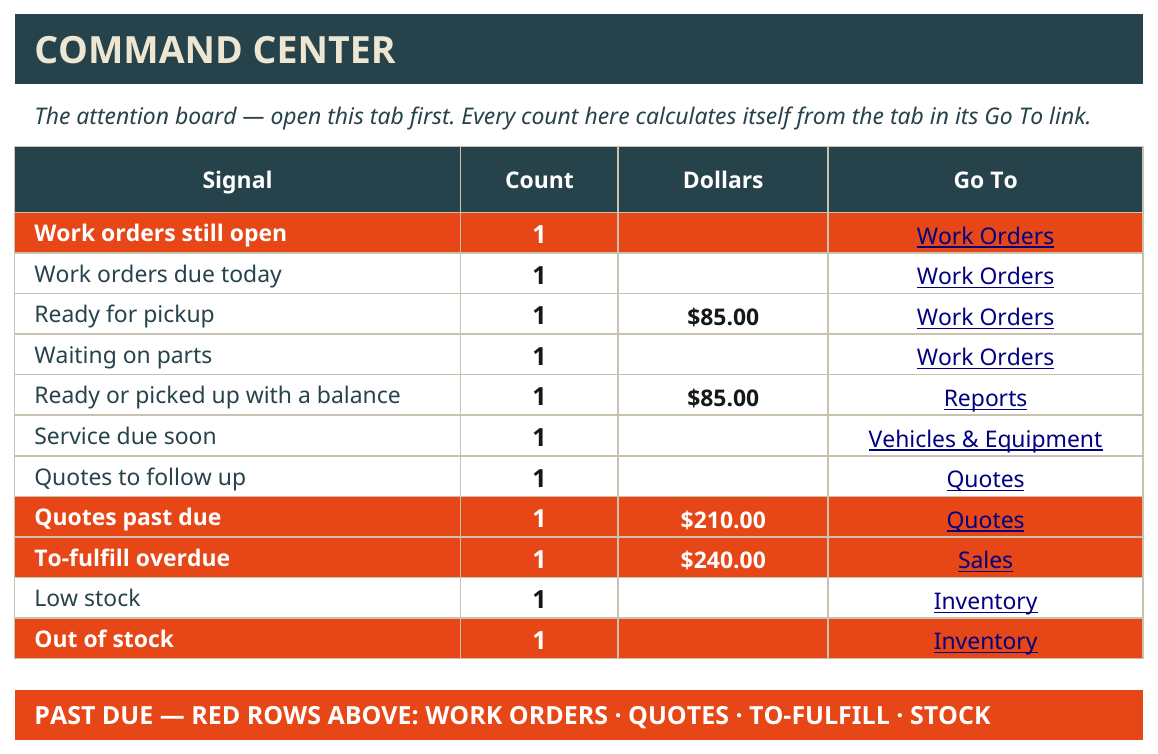
Command Center — open this first, every morning. Work orders due today, work orders still open past their promised date, what's ready for pickup, what's waiting on parts, quotes that need a follow-up, quotes past due, finished work with a balance still owed, service coming due. In red, so it can't hide.
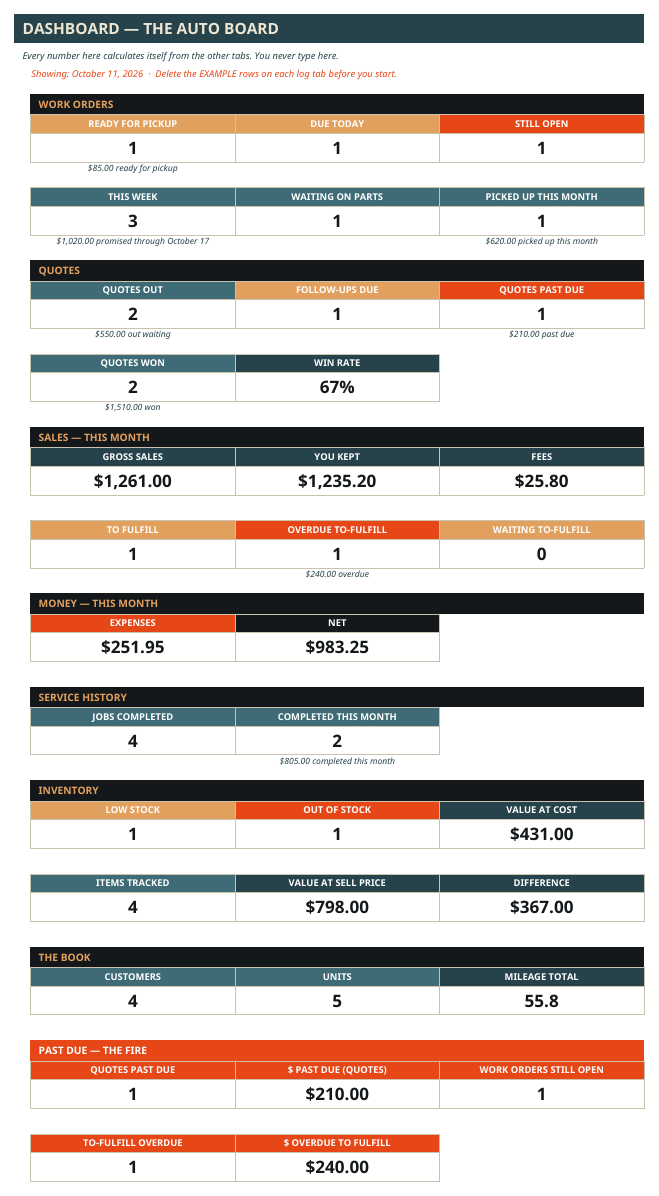
Dashboard — the month's numbers in one look: work orders ready, due, and still open, what got picked up this month, quotes out, money in, money out, what's left.
Customers — every customer, how to reach them, what work they use you for, whether they're OK to text, and when you said you'd follow up.
Vehicles & Equipment — every car, truck, trailer, mower, and tractor: year, make, model, VIN or serial if you track it (optional — the workbook never requires it), plate, and when the next service is due — by date and by mileage or hours.
Quotes — estimates live here: flat job, hourly, or time & materials. Quotes flag themselves when it's time to follow up — and when they're past due. An approved quote becomes the work order.
Work Orders — the job record itself; there's no second job list to keep in sync. Date in, customer, vehicle or equipment, the work, the status, the promised date and time, the amount, labor hours, photos taken. A work order closes one way only: Picked Up. Anything else — even a blank status — counts as still open, on purpose, so nothing sits forgotten.
Day Sheet — one page for the day: what's promised today, in time order; what's ready for pickup, oldest in first, with how many days it's been sitting; and what's waiting on parts. Print it for the shop or pull it up on your phone.
Service History — every completed job, logged per vehicle: what was done, the mileage or engine hours, and the date its warranty runs until. This is the record you search before quoting repeat work — what you did to that unit last time, and what it cost.
Parts Used — the parts that went on each work order, by the job. One rule: parts are a cost record only — a part you buy for a job gets logged here, not on Expenses, so nothing ever gets counted twice.
Work Order Payments — the deposit, the progress payment, the final payment, recorded per work order. Write every payment here and on Sales — Sales is the money record — and the workbook always knows what a job still owes you. A diagnostic fee you credit toward the job counts as paid.
Sales — the money record. What came in, what the fees took, what you kept.
Expenses & Mileage — what went out, and the miles, recorded as you go.
Inventory — filters, belts, brake pads, batteries. Running low flags itself before you're elbow-deep in a job without it.
Reports — money by month, work by service, sales by channel — and the work order money view: for every job, the price, the parts cost, what's been paid, the balance due, and what you actually made per hour of labor.
Settings — your services, your lists, your words, even your warranty window in months. Add a service to the list and every dropdown in the workbook picks it up. Nothing to rewire.
Auto & Equipment Backroom Playbook — every tab and every box explained in plain words, right inside the workbook.
One workbook holds up to 2,000 records per tab — that's years of work orders. It comes loaded with a full example shop (Hendricks Auto & Small Engine) so you can watch a week flow through it before you touch anything — an estimate approved into a work order, a truck ready for pickup, a tractor serviced and picked up, a mower waiting on parts, and every part tracked to the job it went on. Delete the examples and it's yours.
How it works:
✅ Buy it and download two files: the workbook and the User Guide PDF.
✅ Open the workbook in Google Sheets. (A free Google account is all you need.)
✅ Walk through the example business first — a real shop week, start to finish.
✅ Delete the examples, type your customers and vehicles over them, set your services on the Settings tab.
✅ Open the Command Center every morning. That's the whole habit.
Who it's for:
An auto, small engine, or equipment service business run by one or two people — cars and trucks, trailers, mowers and small engines, farm equipment. Solo works fine — the "Who" box just says Owner. Got a helper on some days? Add their name once and pick who's on each job. Shop work, mobile service calls, pickups and deliveries — they're all work orders in the same system, all year.
What it's not:
Not software, not an app. It's a spreadsheet system you own outright — no subscription, no monthly fee, no platform that can raise the price on you.
Not a calendar. You keep your own Google Calendar, in your own account — the User Guide shows you how to set up color-coded calendars (Drop-Offs & Pickups, Promised Work, Mobile Service Calls) with notifications. Feather & Fire never has access to your calendar.
It doesn't text or email your customers for you. It shows you exactly who needs a call, every morning — the morning check is the system. (Your "ready for pickup" call or text is still yours to make; the workbook keeps the record behind it: what's ready, how long it's been sitting, and who's OK to text.)
What's included: the Auto & Equipment Services Back Office workbook (Google Sheets) + the printable User Guide PDF, picture-led and written for a non-spreadsheet expert.
Requirements: a Google account for Google Sheets.
Get it: Auto & Equipment Services Back Office — $79.99, one-time payment.
This is Level 1 of the Feather & Fire platform ladder: the same backend, done by hand, in a file you own.
— Feather & Fire Systems 🔥