

Pet Services Back Office
Your whole pet care business in one workbook — no software, no subscription, yours to own outright.
Pet Services Back Office is a complete spreadsheet backend for a pet services business run by one or two people. The boarding that started last week and never got closed out. The house key still in your console. The December bookings filling up while you're still thinking about October. The pet whose care notes live in a text thread you can't find. It's all in one place, and it works while you're working.
Everything a small business needs. Nothing it doesn't.
What's inside (17 tabs):
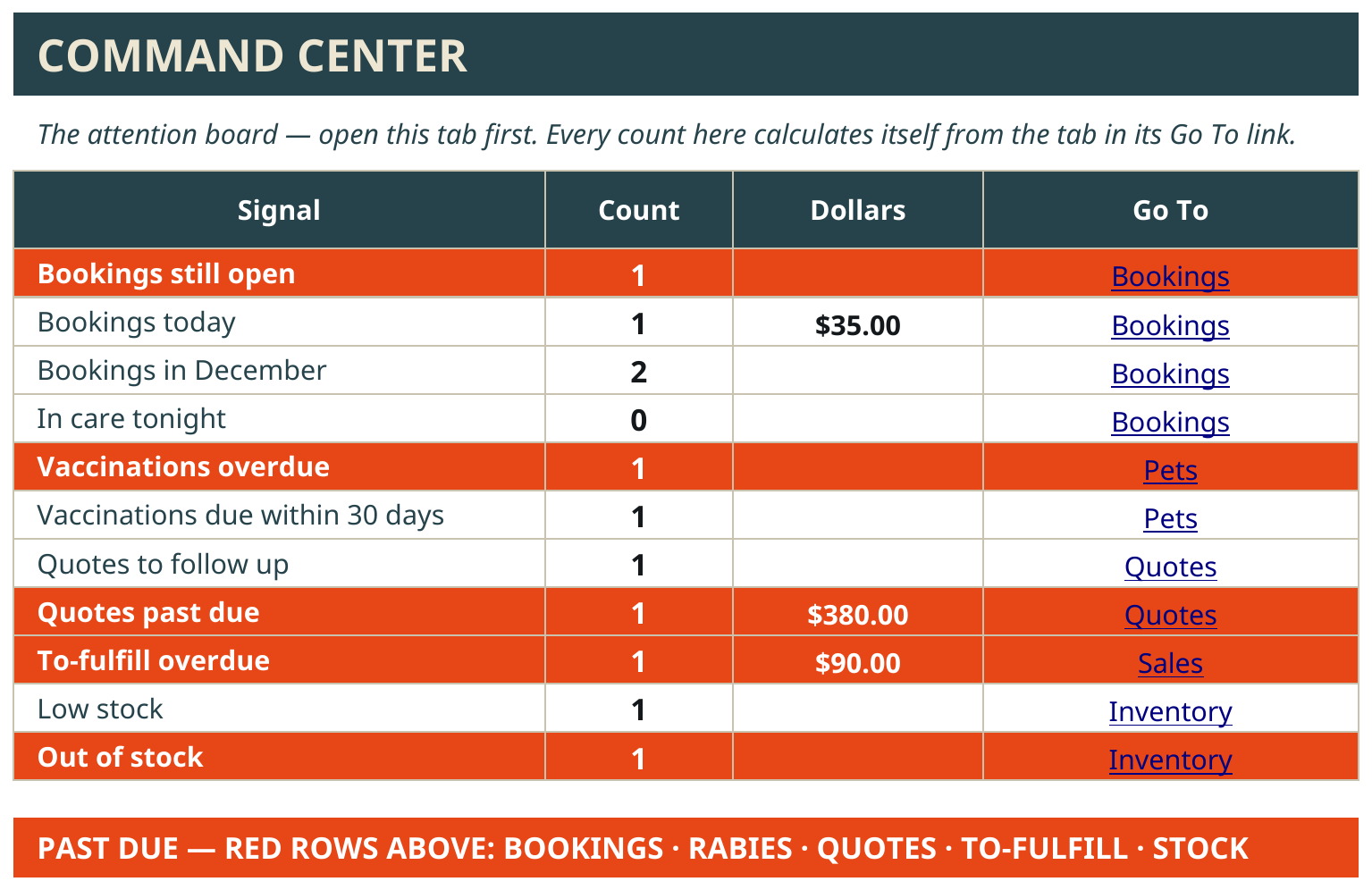
Command Center — open this first, every morning. Bookings still open, bookings today, bookings on the book for December, vaccination dates coming up or past on the records you keep, quotes that need a follow-up, what's out of stock. In red, so it can't hide.
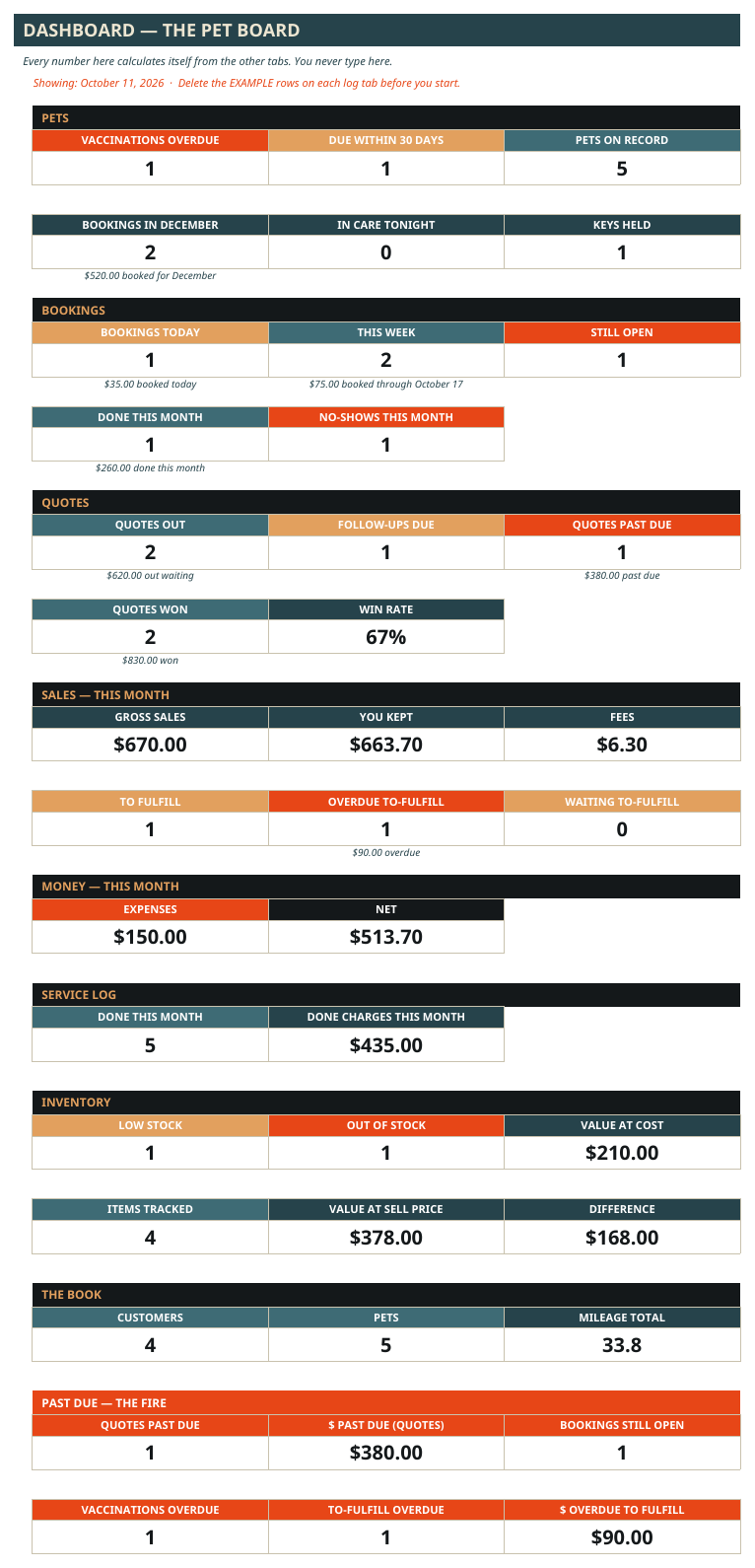
Dashboard — the month's numbers in one look: bookings today and this week, services done, quotes out, money in, money out, what's left — plus how many pets are in care tonight and how many client keys you're holding.
Customers — every owner, how to reach them, what services they use, whether they're OK to text, and when you said you'd follow up — a rebooking conversation gets recorded right there.
Pets — every pet on one record: owner, species and breed, vet name and phone, emergency contact — and the care instructions the owner gave you, in their words: feeding notes, medication notes, handling notes. The rabies due date is recorded exactly as it reads on the pet's own paperwork, and flagged when that recorded date comes within 30 days or goes past. The workbook records dates — it never tells you what a pet needs.
Quotes — boarding packages, sitting stays, recurring walk contracts: priced per night, per visit, as a package, or one flat price. Quotes flag themselves when it's time to follow up — and when they're past due.
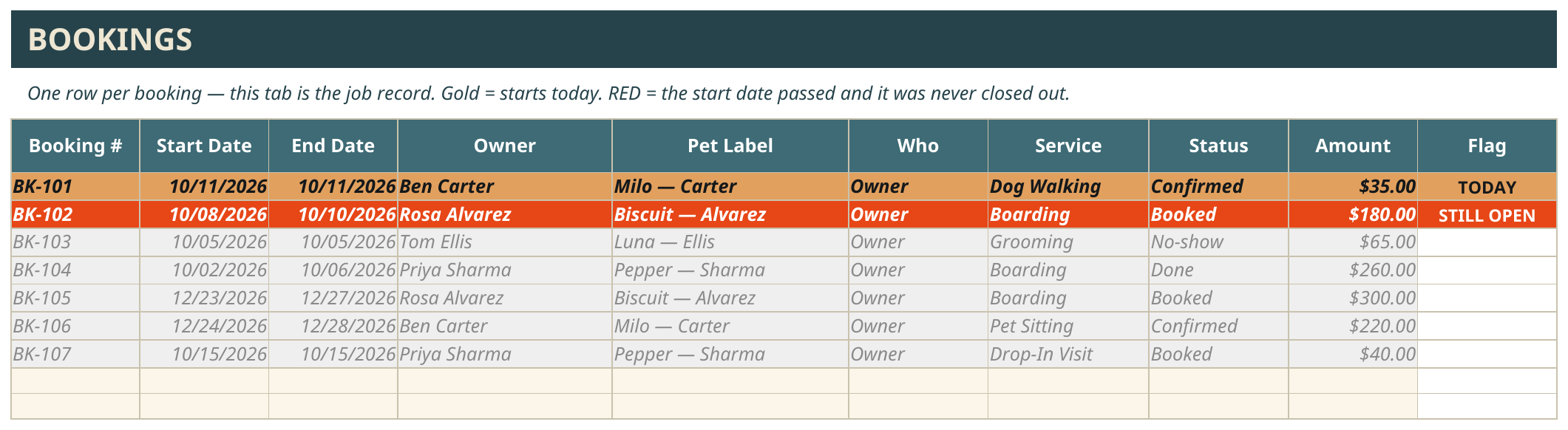
Bookings — the job record itself; there's no second job list to keep in sync. Start and end dates, owner, pet, service, amount. A booking with no closing status counts as still open — on purpose — and one whose start date has passed without being closed flags itself STILL OPEN until you close it.
Day Sheet — one page for the day, in three blocks: today's rounds in time-window order (morning, midday, afternoon, evening), today's bookings, and who's in care tonight — every line carrying the owner's feeding and medication notes pulled from that pet's record, with a box to check off by pen. Print it for the route or pull it up on your phone.
Service Log — the day-to-day record: every walk, drop-in, groom, and stay as it happens, with its time window, the charge written at the service, whether it's paid, and whether you sent the owner a photo. (The photo lives on your phone — the log keeps the record that it went out.)
Key Log — every client key you hold, labeled by code name only — the address is never written — with the day it changed hands and the day it came back. A key still out flags itself STILL OUT until it's logged home.
Sales — the money record. What came in, what the fees took, what you kept.
Expenses & Mileage — what went out, and the miles, recorded as you go.
Inventory — food, treats, shampoo, litter. Running low flags itself before you're standing in a client's kitchen without it.
Reports — money by month, services delivered by service (read from the Service Log, where the work actually happened), sales by channel, and bookings counted by status.
Settings — your services, your lists, your words. Add a service to the list and every dropdown in the workbook picks it up. Nothing to rewire.
Pet Services Backroom Playbook — every tab and every box explained in plain words, right inside the workbook.
One workbook holds up to 2,000 records per tab — that's years of bookings. It comes loaded with a full example pet care business (Happy Paws Pet Care) so you can watch a week flow through it before you touch anything — a boarding stay booked, worked, and closed; a booking left open with its key still out, flagged until it's handled; and two December holiday bookings sitting on the book where you can see them every morning. Delete the examples and it's yours.
How it works:
✅ Buy it and download two files: the workbook and the User Guide PDF.
✅ Open the workbook in Google Sheets. (A free Google account is all you need.)
✅ Walk through the example business first — a real pet care week, start to finish.
✅ Delete the examples, type your customers and pets over them, set your services on the Settings tab.
✅ Open the Command Center every morning. That's the whole habit.
Who it's for:
A pet services business run by one or two people — boarding, pet sitting, dog walking, grooming, drop-in visits. Solo works fine — the "Who" box just says Owner. Got a helper on some days? Add their name once and pick who's on each booking and each visit. Daily rounds, overnight stays, holiday rushes — all in the same system, all year.
What it's not:
Not software, not an app. It's a spreadsheet system you own outright — no subscription, no monthly fee, no platform that can raise the price on you.
Not a calendar. You keep your own Google Calendar, in your own account — the User Guide shows you how to set up color-coded calendars (Boarding Dates, Daily Visits, Grooming Appointments) with notifications. Feather & Fire never has access to your calendar.
Not a health record system and not pet care advice. It keeps the records you type — including the dates written on a pet's own vaccination paperwork — and flags them. What a pet needs is between the owner and their vet; the workbook just remembers what you wrote down.
It doesn't text or email your clients for you. It shows you exactly who needs a call, every morning — the morning check is the system. (Your photo updates and reminders are still yours to send; the workbook keeps the record behind them: today's rounds, who's in care tonight, and who's OK to text.)
What's included: the Pet Services Back Office workbook (Google Sheets) + the printable User Guide PDF, picture-led and written for a non-spreadsheet expert.
Requirements: a Google account for Google Sheets.
Get it: Pet Services Back Office — $79.99, one-time payment.
This is Level 1 of the Feather & Fire platform ladder: the same backend, done by hand, in a file you own.
— Feather & Fire Systems 🔥